Odvex.Admin
Odvex is your go-to destination for unbiased opinions and smart shopping tips.
🎯 Introduction: The Third Revolution of the Air
Since its dramatic unveiling, the MacBook Air has defined the ultrabook category. The M1 chip initiated the second revolution, redefining performance and efficiency. Now, in 2025, the M4 chip signals the third, and most profound, revolution. This machine is the physical manifestation of Apple’s long-term vision: a device built from the silicon up to deliver powerful, personal, and private Apple Intelligence.
This review is an exhaustive technical deep dive. We will move far beyond marketing claims to explore the intricate architecture of the M4 System-on-a-Chip (SoC), dissecting its CPU, GPU, and significantly enhanced Neural Engine. We will demystify Apple’s Unified Memory Architecture and explain why 24GB of unified memory is so transformative. This is the story of a laptop that is not just faster, but fundamentally smarter. For anyone considering an investment in a new portable computer, understanding the technology within the M4 MacBook Air is essential to understanding the direction of the entire industry.
⚙️ Core Features Explained: AI Engine, Unified Memory, and Silence
The M4 SoC: A Deep Architectural Dive
To understand the M4 MacBook Air, you must first understand the chip that powers it. The Apple M4 isn’t just a processor; it’s a complete System-on-a-Chip (SoC). This means the Central Processing Unit (CPU), the Graphics Processing Unit (GPU), the memory controllers, the Neural Engine, and media encoders are all fabricated onto a single, tiny piece of silicon. This integration is the secret to its legendary efficiency.
- The CPU (Performance & Efficiency Cores): Apple continues its balanced approach with a combination of high-performance cores and high-efficiency cores. The performance cores handle demanding tasks like compiling code or applying complex filters in Photoshop, while the efficiency cores manage background tasks, drawing minuscule amounts of power. This dynamic allocation is why the system feels instantly responsive while maintaining epic battery life.
- The Neural Engine: The Heart of Apple Intelligence: This is the most critical evolution in the M4. It’s a dedicated processor with vastly more transistors and computational power than its predecessors, designed for one thing: accelerating machine learning algorithms. Every task powered by Apple Intelligence—from real-time photo editing suggestions to nuanced language understanding in Siri—runs on this engine. Crucially, because it’s on the SoC, these AI tasks are executed locally, ensuring privacy and blistering speed that cloud-based AI can’t match.
- Unified Memory Architecture (UMA): The 24GB Advantage: Traditional PCs have separate pools of RAM for the CPU and GPU, requiring data to be copied back and forth—a slow and power-hungry process. Apple’s UMA creates a single, high-bandwidth pool of memory (24GB in this configuration) that all parts of the SoC can access simultaneously. When the GPU needs an asset, it accesses it directly. This eliminates bottlenecks, drastically improves performance in creative apps, and is a key reason even the integrated GPU feels so powerful.

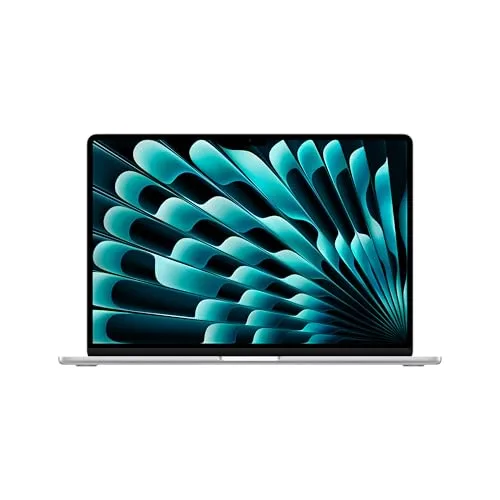
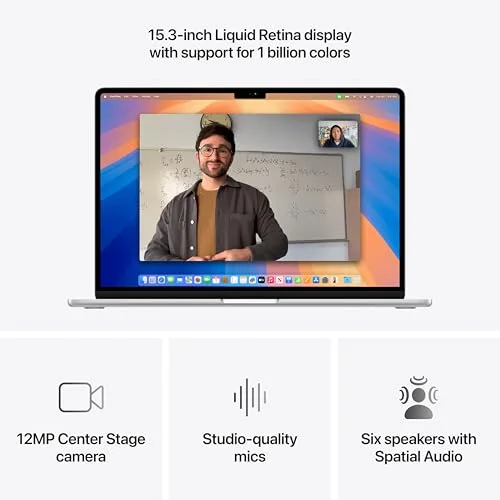
15.3-inch Liquid Retina Display: A Stunning Canvas
While it lacks the ProMotion refresh rate of its Pro siblings, the 15.3-inch Liquid Retina display in the M4 Air is a masterpiece of clarity and color accuracy that shames most competitors.
- Pixel-Perfect Clarity: With a high pixel density, text appears sharp and artifact-free, reducing eye strain during long writing or coding sessions. Icons and interface elements have a precision that feels tangible.
- Wide Color Gamut (P3) & True Tone: The display supports the P3 color space, which is the standard for digital photography and cinema. This means colors are vibrant and accurate, not oversaturated. True Tone is the unsung hero here. Using an ambient light sensor, it automatically adjusts the white balance of the screen to match the light in your environment. This makes the screen appear more like paper, reducing blue light exposure and making long viewing sessions more comfortable.
- Brightness & Real-World Use: At 500 nits of brightness, it’s more than capable for indoor use and is surprisingly viewable in bright indoor lighting. While not the extreme brightness of the Pro’s XDR display for HDR content, it provides an exceptional everyday viewing experience for work and entertainment.
Apple Intelligence in Practice: Not Just Hype
“Apple Intelligence” might sound like a marketing term, but after using it, it becomes a fundamental part of the macOS experience. It’s not a separate app; it’s woven into the fabric of the system.
- On-Device Processing & Privacy: The cornerstone of Apple’s approach is that most intelligence happens on your device. When you ask Siri to “find the document my colleague sent me last week about the budget,” that request is processed locally by the Neural Engine, scanning your emails and files without sending that query to a server. This is a monumental shift for privacy.
- Writing Tools & Image Playground: System-wide writing tools allow you to highlight text in any app and ask it to be rewritten in a different tone (more professional, more concise), proofread for grammar, or summarized. The Image Playground feature lets you generate playful images from text prompts directly in apps like Messages or Notes, all powered by the Neural Engine.
- Siri’s New Contextual Awareness: Siri can now understand personal context. You can ask, “Play the podcast my wife sent me yesterday,” and Siri will find the link in your Messages and start playing it in Apple Podcasts. This contextual understanding, running locally, makes Siri feel less like a voice search engine and more like a capable assistant.
💻 Hands-On Use: Ecosystem Integration and Professional Suite
The Unmatched Magic of the Apple Ecosystem
If you own other Apple devices, the M4 Air transforms from a great laptop into the central hub of a seamless digital experience. This is where the investment pays daily dividends.
- iPhone Mirroring (A Game-Changer): This is arguably the killer feature for ecosystem users. With your iPhone nearby, a new icon appears on your Mac’s dock. Click it, and your iPhone’s screen appears in a window on your MacBook. You can interact with it fully using your trackpad and keyboard—respond to iMessages, use any app, even if it’s not available on macOS. It uses a secure, peer-to-peer connection and is incredibly fluid.
- Continuity Camera & Universal Clipboard: Need to scan a document? Use your iPhone’s superior camera, and it appears instantly on your Mac. Copy a link, address, or snippet of text on your iPhone, and paste it immediately on your Mac. These features move from being “neat tricks” to essential workflow accelerators.
- Expanded Display Support: A major upgrade from previous Air models is the ability to drive two external displays with the laptop lid closed. This finally makes the Air a viable option for a professional desktop setup, connecting to two monitors for a expansive, focused workspace.
Communication and Silent Operation
Designed for the hybrid work era, the M4 Air excels as a communication device.
- 12MP Center Stage Camera: Leveraging the M4’s Neural Engine, the camera doesn’t just capture a sharp image; it intelligently keeps you in frame. As you move around, it pans and zooms smoothly. In group calls, it can even detect others and widen the frame to include them. The image quality, especially in decent lighting, is best-in-class for video conferencing.
- Studio-Quality Mics & Immersive Audio: The three-mic array uses directional beamforming to isolate your voice from keyboard noise, air conditioning, or other ambient sounds. On the other end, callers consistently report clear audio. The six-speaker sound system supports Spatial Audio with Dolby Atmos. When watching supported movies or listening to Apple Music tracks, the audio has a remarkable sense of depth and directionality that belies the laptop’s thin form factor.
- The Silence of Fanless Design: This cannot be overstated. The M4 Air has no fans. Under any workload—whether writing, browsing, or even light video editing—it is completely, utterly silent. There is no whir, no hum, no sudden ramp-up of noise. This creates a profoundly focused and peaceful working environment, especially in quiet rooms or libraries.
Connectivity and Long-Term Value
Apple makes specific choices here that prioritize a sleek profile but require some user adaptation.
- Port Selection: MagSafe is Back: You get two Thunderbolt 4 / USB-C ports (offering 40Gbps speeds for data and display output) and the return of MagSafe 3. MagSafe is a joy—the magnetic charging cable snaps on securely and disconnects cleanly if tripped over, saving your laptop from being yanked off a table. It also frees up the Thunderbolt ports for peripherals.
- The All-Day (and Then Some) Battery: Apple’s claim of “up to 18 hours” isn’t just marketing. In real-world mixed use (web browsing, document editing, video streaming), consistently getting 14-16 hours of battery life is common. This isn’t just “all-day”; it’s “forget-your-charger-at-home” peace of mind. It fundamentally changes how you use the laptop.
- Build Quality & Longevity: The aluminum unibody is incredibly rigid, showing no flex. Combined with Apple’s industry-leading software support (typically 7+ years of macOS updates), the M4 Air is built to be a reliable companion for the better part of a decade. The non-upgradeable nature is a trade-off for this integration and longevity.
⚖️ A Balanced View: Strengths and Compromises
| 👍 Pros (Where It Excels) | 👎 Cons (Considerations) |
|---|---|
| Unmatched Efficiency & Silence: Fanless design delivers completely silent operation and industry-leading battery life (14-18 hours). | Hardware is Sealed: RAM and storage are soldered and cannot be upgraded after purchase, making the initial configuration choice critical. |
| Future-Proof AI Foundation: The powerful M4 Neural Engine enables fast, private Apple Intelligence features, setting the standard for on-device AI. | 60Hz Display Refresh Rate: While gorgeous, the display lacks the smoother 120Hz ProMotion scrolling found on MacBook Pro models, a noticeable difference for some. |
| Ecosystem Synergy: Features like iPhone Mirroring and Universal Clipboard create a seamless, time-saving workflow for Apple device owners. | Port Selection Requires Planning: Only two Thunderbolt ports mean heavy dongle or hub reliance for users with multiple legacy peripherals (USB-A, HDMI, SD card). |
| Premium Build & Experience: Exceptional build quality, best-in-class trackpad, excellent speakers and microphones, and a superb keyboard. | Sustained Performance Ceiling: While incredibly powerful for bursts, the fanless design can lead to thermal throttling under continuous, heavy loads (like long 4K video exports), a scenario where a MacBook Pro would maintain higher speeds. |
📊 The Competitive Landscape: Where Does It Stand?
| Feature / Device | Apple MacBook Air 15″ (M4) | Apple MacBook Pro 14″ (M3 Pro) | Dell XPS 14 (Intel Ultra 7) | Framework Laptop 16 (AMD) |
|---|---|---|---|---|
| Core Philosophy | Ultimate Portability & Ecosystem AI | Maximized Creative Performance | Premium Windows Design & Versatility | Maximum Repairability & Customization |
| Key Processor | Apple M4 (4P+6E + 10-core GPU) | Apple M3 Pro (11/12-core CPU) | Intel Core Ultra 7 155H | AMD Ryzen 7 7840HS |
| AI Engine | 16-Core Neural Engine (Apple Intelligence) | 16-Core Neural Engine | Intel NPU (Copilot+ AI) | AMD Ryzen AI (Windows Studio Effects) |
| Display | 15.3″ Liquid Retina, 60Hz | 14.2″ Liquid Retina XDR, 120Hz ProMotion | 14.5″ OLED Touch, 120Hz | 16″ IPS, 165Hz (Modular) |
| Cooling & Noise | Fanless (Silent) | Active Cooling (Fans, can be audible under load) | Active Cooling (Generally quiet) | Active Cooling (Performance-focused) |
| Battery Life | Exceptional (14-18 hrs) | Very Good (10-12 hrs) | Good (8-10 hrs) | Moderate (6-8 hrs) |
| Upgradeability | None (Soldered) | None (Soldered) | SSD only | Fully Modular (RAM, SSD, Ports, GPU) |
| Ideal User | Student, Mobile Pro, Apple Ecosystem Devotee | Video Editor, Developer, Power Creative | Windows Professional valuing design & touchscreen | Tinkerer, Tech Enthusiast, Advocate for Right-to-Repair |
👤 Who Is This Machine Really For?
The M4 MacBook Air has a distinct user profile. It’s not a one-size-fits-all machine, but for its target audience, it’s nearly perfect.
- The All-In Apple User: If your world runs on iPhone, iPad, and maybe an Apple Watch, this laptop is the final, perfect piece. The seamless integration—iPhone Mirroring, Handoff, AirDrop—isn’t just convenient; it fundamentally changes and streamlines your daily workflow, eliminating friction between devices.
- The Student and Mobile Professional: Its combination of light weight, all-day battery life, and silent operation makes it the ultimate campus or coffee shop companion. It has more than enough power for research, writing, coding, presentations, and light creative work, all without ever needing to hunt for an outlet or distract others with fan noise.
- The User Who Values Privacy and Future-Proof AI: If you’re skeptical of cloud-based AI sending your data who-knows-where, Apple’s on-device Intelligence is a compelling alternative. The M4’s Neural Engine ensures you get powerful AI tools for writing, image creation, and scheduling that are fast and keep your personal information on your device.
- NOT For: Hardcore gamers (due to integrated graphics), users who need to run specific Windows-only x86 applications without emulation, or professionals who regularly perform sustained, processor-intensive tasks like rendering complex 3D scenes or compiling massive codebases for hours on end (where a MacBook Pro’s active cooling is essential).
📝 The Bottom Line: A New Benchmark for the Everyday Laptop
The MacBook Air M4 decisively wins in the categories that matter most for everyday excellence: battery life, portability, silence, and ecosystem integration. Compared to a premium Windows ultrabook, it offers a more cohesive and polished experience, with a trackpad, speakers, and system-level software integration that are in a different league.
The more interesting comparison is within Apple’s own lineup: the Air vs. the Pro. The Air sacrifices the Pro’s higher-sustained performance, dazzling 120Hz ProMotion display, and additional ports to achieve its fanless, impossibly thin design. For probably 80% of users—including many who call themselves “professionals”—the Air’s performance is more than sufficient, and its advantages in weight, silence, and battery life are tangible benefits they’ll appreciate every single day. The Pro is for those whose livelihood depends on pushing the silicon to its absolute limits, constantly.
🌟 Final Verdict: The Laptop Perfected for Most
The 2025 MacBook Air with the M4 chip isn’t just an incremental update; it’s the culmination of Apple’s silicon journey thus far. It successfully integrates a powerful, AI-optimized chip into a form factor that remains stunningly thin, light, and completely silent. The addition of meaningful features like dual external display support and the transformative nature of Apple Intelligence (powered by the exceptional Neural Engine) elevates it beyond a simple hardware refresh.
It makes a compelling case that for the vast majority of people—students, writers, consultants, creatives working in photography or light video, and anyone embedded in the Apple ecosystem—this is the most rational, satisfying, and future-proof computer you can buy. It delivers a premium experience that is both powerful and peaceful, a tool that gets out of your way while reliably handling anything you throw at it. For redefining what an “everyday” laptop can be, the M4 MacBook Air doesn’t just meet expectations; it exceeds them, setting a new gold standard.
Read more articles on this topic: Laptops.