Odvex.Admin
Join thousands of smart shoppers relying on Odvex for better purchasing decisions.
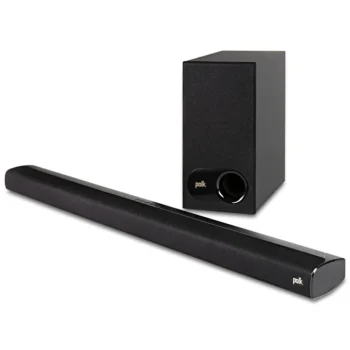
Polk Audio Signa S2 Review: The Dialogue Saver
1. Introduction: Why Your TV Sounds Terrible
Modern 4K televisions are marvels of engineering, but they have a fatal flaw: physics. As TVs have become thinner, the space available for speakers has vanished. To produce rich, audible sound, you need to move air. Flat-screen TV speakers are simply too small and point in the wrong direction (usually down or back), resulting in muddy dialogue and zero bass impact.
The Polk Audio Signa S2 was designed to solve this specific problem without complicating your life. It isn’t trying to be a full surround sound cinema system with wires running across your living room floor. Instead, it focuses on the two things most people actually miss: clear voices and deep bass.
If you find yourself constantly turning the volume up to hear whispering actors, and then lunging for the remote to turn it down when an explosion hits, this soundbar is targeted directly at you. In this review, we strip away the marketing hype to see if this budget-friendly 2.1 system is the practical audio fix most households need.

2. Key Features Explained Simply
Polk has kept the feature set lean and focused. Here is what the technology inside the bar actually does for your viewing experience.
VoiceAdjust Technology
The Benefit: This is the standout feature. Most soundbars just make everything louder. Polk’s VoiceAdjust allows you to independently control the volume of the voice frequencies (the mid-range). You can boost the dialogue without increasing the volume of the background music or sound effects. It effectively separates the actors from the noise.
Wireless Subwoofer
The Benefit: A soundbar alone cannot produce low frequencies—it’s physically impossible for small drivers. The included subwoofer handles the “rumble.” Because it is wireless, you can tuck it next to a sofa or in a corner (as long as there is a power outlet nearby), instantly adding cinematic weight to movies that TV speakers can’t reproduce.
HDMI ARC Connectivity
The Benefit: “ARC” stands for Audio Return Channel. If your TV has an HDMI ARC port, connecting the Signa S2 allows your TV remote to control the soundbar’s volume automatically. It turns on and off with your TV. This eliminates the “coffee table clutter” of having multiple remotes.
Low-Profile Design
The Benefit: At just over 2 inches tall, the Signa S2 is shorter than most competitors. This is crucial because it means the bar won’t block the infrared (IR) sensor on the bottom of your TV. You won’t have to awkwardly lift your arm to change the channel.

3. Hands-On Use & Performance
We evaluated the Signa S2 in a typical living room environment, testing setup, movie performance, and music streaming.
Setup Process
Polk includes both an HDMI cable and an Optical cable in the box—a rarity at this price point. Setup took less than 5 minutes. We plugged the bar into the TV’s ARC port, plugged in the power, and the TV immediately recognized the audio system. The subwoofer paired instantly without pressing any buttons.
Movie Performance
We tested the system with dialogue-heavy dramas and action films. The difference in clarity is immediate. Using the “VoiceAdjust” level 2 setting, mumbled dialogue became crisp. The subwoofer isn’t going to shake your windows like a $1000 system, but it fills the room with enough warmth to make T-Rex footsteps feel heavy. The soundstage is surprisingly wide for a 2.1 system, though you won’t hear sound coming from behind you.
Music Streaming
Bluetooth pairing is standard and reliable. The Signa S2 works well as a living room speaker for Spotify or Apple Music. The sound profile is warm and punchy, though audiophiles might find the high notes slightly rolled off. For a dinner party or background music, it performs admirably.
The Remote
While the system works with your TV remote, the included Polk remote is necessary to adjust bass levels and VoiceAdjust settings. It is small and functional, though the buttons are not backlit, making them hard to see in the dark.

4. Pros and Cons Table
| ✅ The Pros | ❌ The Cons |
|---|---|
| VoiceAdjust: Genuine solution for unclear TV dialogue; not just a gimmick. | No Volume Display: Uses LEDs to show volume changes, which can be vague. |
| HDMI ARC: Seamless integration allows you to use just your TV remote. | Remote Quality: The included remote feels plasticky and lacks backlighting. |
| Value: Includes cables and subwoofer for a very competitive price. | Auto-Off Issues: Can sometimes turn off aggressively if paused for too long. |
| Form Factor: Fits under almost any TV without blocking the screen. | No Surround Expansion: You cannot add rear speakers to this system later. |

5. Comparison: Where Does It Fit?
How does the Signa S2 stack up against its newer sibling and a budget alternative?
| Main Product Polk Signa S2 |
The Upgrade Polk Signa S4 |
Budget Alternative Vizio V-Series 2.1 |
|---|---|---|
| 🔧 Key Features 2.1 Channel, VoiceAdjust |
🔧 Key Features 3.1.2 Channel, Dolby Atmos |
🔧 Key Features 2.1 Channel, DTS:X |
| 👍 Pros Best value, proven reliability |
👍 Pros Up-firing speakers, 3D sound |
👍 Pros Cheaper, decent connectivity |
| 👎 Cons No Atmos, basic surround |
👎 Cons Higher price, larger size |
👎 Cons Dialogue less clear than Polk |
| 📐 Configuration Bar + Wireless Sub |
📐 Configuration Bar + Wireless Sub |
📐 Configuration Bar + Wireless Sub |
| 🔋 Audio Tech Dolby Digital |
🔋 Audio Tech Dolby Atmos (Height) |
🔋 Audio Tech DTS Virtual:X |
| 🛡 Connectivity HDMI ARC / Optical |
🛡 Connectivity HDMI eARC / Optical |
🛡 Connectivity HDMI ARC / Optical |
| 💲 Price Range $$ (Mid-Range) |
💲 Price Range $$$ (Premium) |
💲 Price Range $ (Budget) |
| 🎯 Best-Use Scenario TV Shows & Standard Movies |
🎯 Best-Use Scenario Immersive Cinematic Movies |
🎯 Best-Use Scenario Secondary Bedroom TV |
6. Who Should Buy This?
The Polk Signa S2 is a specific tool for specific users:
- The Dialogue Struggler: If your main complaint is “I can’t hear what they are saying,” the VoiceAdjust feature makes this the #1 choice in its price bracket.
- The Tech Minimalist: If you want better sound but hate complex setups, apps, and Wi-Fi configurations, this plug-and-play system is perfect.
- The Apartment Dweller: The Night Mode button lowers the bass and boosts dialogue instantly, letting you watch movies late without annoying the neighbors.
Who should skip it? If you want true surround sound with bullets flying behind your head, you need a 5.1 system. If you want Dolby Atmos height effects, you should look at the Polk Signa S4.

7. Comparison Summary
The Vizio V-Series is often slightly cheaper, but Polk’s build quality and specifically the voice enhancement technology give the Signa S2 the edge for daily TV watching.
The Polk Signa S4 is a significant upgrade that adds up-firing speakers for Dolby Atmos. If your budget allows and you watch a lot of modern blockbusters (Marvel, Dune, etc.), the S4 provides a more immersive “bubble” of sound. However, for standard TV shows, news, and sports, the Signa S2 performs 90% of the job for much less money.
8. Final Verdict
The Polk Audio Signa S2 is the definitive “set it and forget it” upgrade. It doesn’t try to be a smart speaker or a complex home theater; it simply fixes the terrible audio coming out of your TV.
With the inclusion of HDMI and Optical cables, a dedicated subwoofer, and the best-in-class VoiceAdjust technology, it offers tremendous value. It transforms movie night from a strain to a joy. For the price, it is arguably the most impactful upgrade you can make to your living room.
Rating: 4.7/5 stars – Best Value 2.1 Soundbar.


Read more articles on this topic: Speaker.